Physics Simulation
Flitter supports a simple system for running physics simulations of particle systems. The physics engine is configured with a set of nodes and will store the current position and velocity of each particle in the state dictionary, allowing it to be linked back to rendering code and nodes.
A new physics system is introduced by a !physics node at the top level,
containing a number of !particle or !anchor nodes along with force applier
nodes that define the specific physics of the system.
The physics engine is designed – as far as possible – to operate consistently
across any number of dimensions. For instance, the !buoyancy force is
proportional to the displaced mass, which will be calculated as a density
coefficient multiplied by the area in two dimensions and the volume in
three. When calculating such values, the standard constant terms (e.g.,
\(\pi\) for area and \({4 \over 3} \pi\) for volume) are not included in the
calculations, on the basis that these can be easily incorporated into force
coefficients for physically-correct operation. The actual equations used for
each force are given below.
Systems with higher than three dimensions are possible, but their use may be limited to theoreticians. On the other hand, one-dimensional systems are genuinely useful for simulating objects constrained to move in a single dimension - like beads on a wire - where collisions, drag, springs and rubber bands are all well defined forces.
Nodes
!physics
A !physics node at the top level in a Flitter script creates a new
simulation system. The attributes are:
stateis a required attribute giving a state prefix key; all of the state of the system will be stored in the Flitter state dictionary with keys prefixed by thisdimensionsis a required attribute giving the number of dimensions of the system, i.e., the length of the position, value and force vectors (must be greater than or equal to1)timeis an optional attribute providing the simulation clockresolutionis an optional attribute specifying a minimum simulation step intervalrunspecifies an optional integer “run number” for this simulation, non-integer values will be flooredspeed_of_lightis an optional attribute that, if set, specifies an upper limit to any particle’s computed speed
If time and resolution are not specified then the system will default to
Flitter’s internal frame time (i.e., the value of the time global) and
the target frame-rate interval (i.e., 1/fps) respectively. This means that
the simulation time units will be seconds and the simulation will advance in
time steps equal to the frame interval. If time is specified then
resolution should be set to a sensible matching value somewhere at or above
the expected increment in time at the engine frame-rate.
If run changes then the current system state is abandoned and the simulation
will begin again from the starting positions and velocities of each particle.
As this value is floored before being used, a simulation can be easily reset
at intervals by setting run=time/interval.
All other nodes described below must be contained within a !physics node.
Note
Starting a simulation with forces immediately applied can cause wild instability
due to massive forces being computed. This applies particularly when using a
collision force applier and particle starting positions that may overlap. To
avoid this, all forces can be “eased”-in with the ease attribute. This
specifies an amount of simulation time to linearly ramp up the strength of the
force applier, giving an amount of time for particles to settle into more stable
positions.
The Simulation Clock
The simulation maintains an internal simulation clock that begins at zero and
advances in simulation steps. On each frame, a delta is calculated between
the current value of time minus the value at the last frame. The simulation
step will be the minimum of this delta and resolution.
If each delta is smaller than resolution, the internal clock will advance in
lockstep with time. If not, then the simulation will advance at resolution
intervals instead. This allows resolution to be used to avoid numerical
instability being caused by computing forces with large time deltas.
If the delta is greater than resolution, then the physics engine may insert
an additional simulation step if the general performance of the engine is good.
This allows the simulation to keep up if an occasional frame is delayed.
If the engine is consistently unable to keep up with the requested resolution,
then the internal simulation clock will advance more slowly than time and the
simulation will subjectively slow down (although all of the particles will
actually be moving correctly with respect to the simulation clock). It is best
to reduce program/simulation complexity if this is the case (or increase
resolution if the simulation will remain stable run at a lower granularity).
If Flitter is run in non-realtime mode, with the --lockstep command-line
option, then the simulation behaviour is different.
In non-realtime mode, the simulation will always insert as many additional
simulation steps per frame as necessary to keep to the minimum resolution.
For example, if resolution is set to 1/60 and the engine is run with
--lockstep --fps=30 – for instance, to record an output video – then the
simulation will advance two steps at each frame instead of subjectively
slowing down.
The internal simulation clock can be read from the state and used to track the actual amount of simulation time that has passed (see State interaction below).
!particle
A !particle node specifies a point/spherical object to be simulated. At each
step, the physics engine will compute the forces to be applied to each particle
based on their properties, current positions and velocities. These forces will
then be applied to the current velocity to generate a new velocity and the
position updated based on this.
The attributes that specify properties of the particle are:
id- each particle must have a uniqueidattribute and this will be combined with the!physics’state_prefixvalue to produce keys against which the current state of the particle will be stored in the state dictionaryposition- specifies an initial position vector to use for the particle at the first simulation step (defaults to0)velocity- specifies an initial velocity vector (defaults to0)force- specifies an instantaneous force vector to be applied to the particle, this may be changed at any point during the simulation to create custom forces, e.g., thrust from an engine (defaults to0)ease- specifies an amount of simulation time over which to ramp up the force vector (does nothing ifforceis not specified)radius- specifies the radius of the particle, this defines the outer edge of the particle as a distance from the current position in all dimensions (defaults to0and will be clamped to0if negative)mass- specifies the inertial and gravitational mass of the particle (defaults to1and will be clamped to0if negative)charge- specifies the electrical charge of the particle (defaults to0)
As mass is used when calculating acceleration, particles with zero mass
cannot be the subject of a force, meaning they will always continue travelling
at their initial velocity (or remain fixed at their initial position).
However, particles with zero mass will still be considered when computing
forces on other particles.
The position, velocity and force attributes should be \(n\)-element
vectors, where \(n\) is the value of the !physics dimensions attribute. The
ease, radius, mass and charge attributes should all be a single element
vector value. The radius of a particle represents a Euclidian distance from
the particle’s position. For a 1-dimensional system this describes a line
through the position on the axis, for a 2-dimensional system it describes a
circle around the position and for a 3-dimensional system it describes a sphere
centred on the position.
Note
As radius and charge default to 0, you will need to set these to sensible
values for all particles that are to respond to forces that depend on these
properties, such as !drag and !electrostatic.
!anchor
An !anchor is a particle that is considered for the purposes of calculating
forces, but will not be affected by any force – including a force
attribute. The attributes are otherwise the same as for !particle, with the
added difference that position specifies the current position of the object
rather than an initial value, so an !anchor may be arbitrarily moved around.
While a zero-mass particle is similar to an anchor, a zero-mass particle cannot be moved once the simulation has started. An anchor can usefully have zero mass, for example if it is to be one side of a distance force but should be ignored for the purposes of calculating attraction due to gravity.
!constant
Specifies a constant force or acceleration to be applied to all particles. This is useful for simulating global forces, such as large-body gravity.
force- specifies a constant force vectoracceleration- specifies a constant acceleration vectorstrength- specifies a multiplier forforce/accelerationvector (default is1)ease- specifies an amount of simulation time over which to ramp upstrength
Both force and acceleration may be specified and will apply separately. If
acceleration is specified then it is converted into an equivalent force by
multiplying by the particle mass.
!random
Specifies a random, “Brownian motion”, force to be applied to all particles. This consists of a normal variate, per-particle, force that varies on each simulation step.
strength- force magnitude coefficient (default is1)ease- specifies an amount of simulation time over which to ramp upstrength
!field
!field creates a uniformly oriented force that will apply to all particles
in proportion to their charge attribute. Positively-charged particles will be
accelerated in the direction of the field and negatively-charged particles will
be accelerated in the opposite direction to the field.
direction- a vector specifying the direction of the electric fieldstrength- force magnitude coefficient (default is1)ease- specifies an amount of simulation time over which to ramp upstrength
direction does not need to be a unit vector – and will not be normalized. Any
magnitude of the vector will be combined with strength to specify the field
strength.
!distance
Specifies a force to be applied between two specific particles that scales with displacement from a minimum or maximum distance. This can be used to simulate various tethers, rubber bands and springs.
from- theidof the first particleto- theidof the second particleminimum(ormin) - a minimum distance that the two objects can be apartmaximum(ormax) - a maximum distance that the two objects can be apartfixed- a shortcut for setting bothminandmaxto the same valuepower- the power to which the displacement will be raised (default is1)strength- force magnitude coefficient (default is1)ease- specifies an amount of simulation time over which to ramp upstrength
!collision
This creates an implicit !distance force applier between all pairs of
particles, with min set to the sum of the radius attributes of each
particle. Particles with zero radius will be ignored.
power- the power to which the displacement will be raised (default is1)strength- force magnitude coefficient (default is1)ease- specifies an amount of simulation time over which to ramp upstrength
The strength attribute is inversely proportional to the elasticity of the
particles: lower values mean the particles can overlap more before bouncing
apart. Setting this value too high can cause wild instability – especially if
random starting positions are chosen that might cause particles to overlap each
other.
!gravity
!gravity creates an attractive force that applies to all pairs of particles
in proportion to the product of their mass attributes and inversely
proportional to the square of the distance between the particles. Particles
with zero mass will be ignored.
strength- force magnitude coefficient (default is1)ease- specifies an amount of simulation time over which to ramp upstrengthmax_distance- pairs of particles further apart than this will be ignored
As gravity falls off with the square of the distance, strength will normally
need to be quite a large number to see any noticeable effect. max_distance is
an optimization feature that allows running the simulation slightly faster by
skipping over particle pairings where they are far apart and will have only a
minimal effect on each other.
The distance value \(l\) is constrained to be no smaller than the sum of the two particles’ radii, i.e., overlapping particles experience a constant attractive force. This is to avoid wild instability caused by two particles being crushed together.
!electrostatic
!electrostatic creates a repulsive force that applies to all pairs of
particles in proportion to the product of their charge attributes and
inversely proportional to the square of the distance between the particles.
Particles with zero charge will be ignored. Particles with the same sign
charge will repel each other and particles with oppositely signed charges will
attract each other.
strength- force magnitude coefficientease- specifies an amount of simulation time over which to ramp upstrengthmax_distance- pairs of particles further apart than this will be ignored
Except for being reversed and the ability to have negative charges, electrostatic force operates in the same way as gravity – including the rule for overlapping particles.
!adhesion
!adhesion creates a combined attractive/repulsive force that applies to all
pairs of particles that touch. The force acts to maintain an adhesion
distance between pairs of particles while they are in contact.
The adhesion distance is determined by the overlap attribute, which should be
between 0 and 1. At 0, no overlap is tolerated (resulting in the
equivalent of a !collision force with power=2) and at 1, the smaller
particle will be drawn completely within the larger.
overlap- a factor controlling the amount of overlap (default is0.25)strength- force magnitude coefficientease- specifies an amount of simulation time over which to ramp upstrength
As adhesion contains a repulsive force, it is not normally necessary to use it
together with !collision.
Note
The !collision, !gravity, !electrostatic and !adhesion force appliers
are all compute-intensive as they have to consider all particle pairs and
so have \(O(n^2)\) time-complexity.
!drag
!drag simulates the effect of particles moving through a liquid/gas by
applying a force to each particle, against the direction of movement, in
proportion to the square of the speed and the particle cross-sectional size
(the radius raised to the power of \(\textbf{dimensions} - 1\)). This is
very useful for taking energy out of a simulation, otherwise particles will
tend to bounce around forever. Particles with zero radius will be ignored.
flow- specifies the velocity of the medium (default is0)strength- force magnitude coefficientease- specifies an amount of simulation time over which to ramp upstrength
The flow attribute allows simulation of a moving medium, such as a river or
a breeze. If flow is a non-zero vector then the !drag force will accelerate
particles until they are motionless with respect to the medium.
As drag scales with the square of the speed and the particle cross-sectional
area, the strength coefficient should normally be a very small number. This
force applier is limited to ensure that simulation granularity issues cannot
cause a particle to reverse direction (with respect to the medium).
!buoyancy
!buoyancy simulates the effect of particles rising or falling within a fluid
based on their relative density to that fluid and the effects of gravity. The
force is equal to the mass of the particle minus the displaced mass of the
surrounding fluid (i.e., the volume of the particle multiplied by the density
of the fluid) multiplied by the gravity vector.
gravity- vector specifying the direction and magnitude of gravity (default is a vector with the last dimension equal to \(-1\))density- the density coefficient of the surrounding fluid (default is1)strength- force magnitude coefficientease- specifies an amount of simulation time over which to ramp upstrength
Particles with either zero radius or zero mass will be ignored.
Barriers
A !barrier constrains all particles to be on one side of it. In the case of
a system with 3 dimensions, this will be an infinite plane; with 2 dimensions,
a line; and with 1 dimension, a point.
position- specifies the origin for the barriernormal- specifies the orientation of the barrier; particles are constrained to be on the side of the barrier in the direction of this vector
If a particle’s outer edge (incorporating its radius) crosses a barrier, it
will “bounce” by reflecting its velocity in the normal of the barrier.
Particles bouncing off a barrier will have reflected speed equal to the speed
at which they hit the barrier multiplied by the coefficient of restitution: a
value of 1 will result in a perfectly elastic collision, whereas 0 would
mean all of the particle’s velocity is absorbed.
restitution- the coefficient of restitution (default is1)
The !barrier node also accepts the same 'minimum, maximum, power,
strength and ease attributes as !distance, which will create a distance
constraint on all particles with respect to the barrier. This can be used to
create a “soft” boundary. The “hard” bounce condition is still applied if the
particle crosses the barrier.
minimum(ormin) - a minimum distance that particles may be from the barriermaximum(ormax) - a maximum distance that particles may be from the barrierpower- the power to which the displacement will be raised (default is1)strength- force magnitude coefficient (default is1)ease- specifies an amount of simulation time over which to ramp upstrength
If min is specified and non-zero then the particle will have a force applied
to it, proportional to the displacement from the minimum distance raised to
power and multiplied by strength, in the direction of the barrier normal.
Groups
A !physics system may contain one or more nested !group nodes. Each begins
a new semi-isolated group of particles and forces. The !physics node counts
as the outermost group. Particle (and anchor) ids must be unique across the
entire system.
Forces (and barriers) declared in a group apply to all particles declared in
that group, and all particles declared in sub-groups of that group. Forces
declared at the top level of a !physics system apply to all particle
within the system.
For forces that apply between pairs of particles, particles are only able to
“see” other particles in the same group, in sub-groups and in parent groups,
but not particles in sibling groups – with the exception of particles
referenced explicitly by id.
To restrict a force to apply to only a specific set of particles, declare the
force and the particles within a !group. To make specific particles visible
between two groups, declare the force and those particles in the parent of the
two groups.
State interaction
For a !physics system with state set to prefix, and a particle with id
set to id, the following key/value pairs will be stored in the state
dictionary:
prefix - the value of
timewhen the simulation (or run) startedprefix
;:last- the last value oftimeprefix
;:clock- the (zero-based) internal simulation clockprefix
;:run- the last run number (as an integer value)prefix
;:iteration- the number of the last simulation iteration for this run (an integer counting from0)prefix
;id - the last position of the particleprefix
;id;:velocity- the last velocity of the particle
!anchor particles still store their position and velocity in the state
dictionary, even though position will always be whatever was provided with the
position attribute and velocity will always be a zero vector.
state and id can be any non-null vectors, but id must be unique within
the system and state must be unique if multiple simultaneous systems are
used. Obviously one should avoid using a state prefix that might collide with
other users of the state dictionary, such as MIDI controllers. One should also
not use :last, :clock or :run as the id of a particle.
Performance of the state system is negatively affected by using id values
that contain strings - stick to symbols when possible.
Example
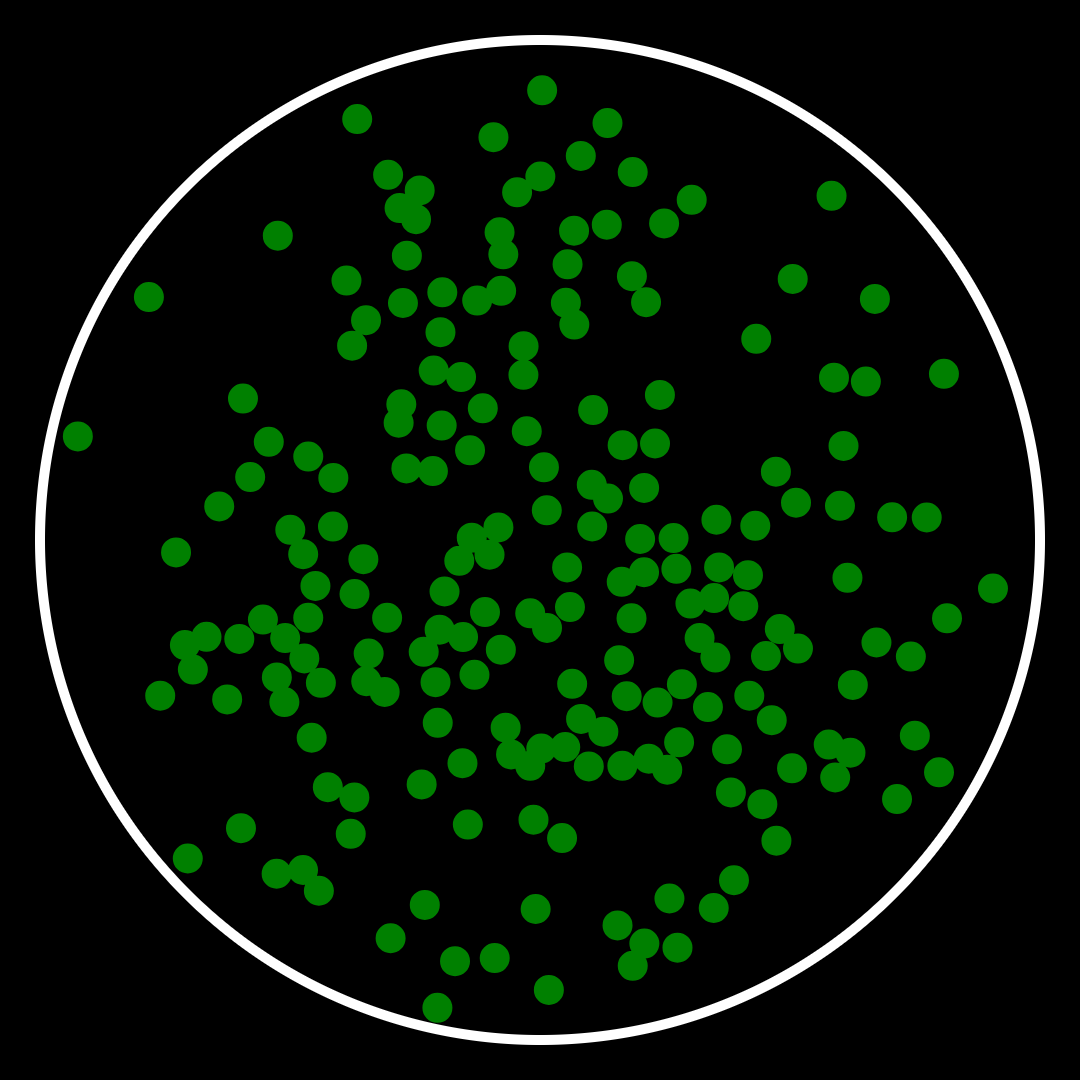
This example creates a “petri dish” of cell particles with normally-distributed
random charges. An !electrostatic force applier makes the cells drift together
or apart, clumping up into different shapes. Chains of cells with alternating
charge will form and break up.
A !collision force applier stops them from overlapping with each other and a
!distance force applier is used to constrain the particles within the dish
by setting a maximum distance for each from an anchor in the middle. A !drag
force applier slows the particles as if they are moving through a liquid.
Without any external forces, the drag will cause this system to come to a static
equilibrium, so a !random force is applied to each particle.
The beat clock is used as the simulation time, allowing the simulation to be
sped up or slowed down by altering the tempo. resolution is calculated to
match the current tempo to the target frame-rate.
%pragma tempo 60

let SIZE=1080;1080
    NCELLS=200
    RADIUS=15
    DISH=500

!physics state=:cells dimensions=2 time=beat resolution=tempo/60/fps
    !anchor id=:middle position=0;0
    for i in ..NCELLS
        let start=(DISH-RADIUS)*beta(:r)[i]*polar(uniform(:th)[i])
            charge=normal(:charge)[i]
        !particle id=i charge=charge radius=RADIUS position=start
        !distance strength=1000 max=DISH-RADIUS from=i to=:middle
    !electrostatic strength=200 ease=10
    !collision ease=10
    !drag strength=0.001
    !random strength=10

!window size=SIZE
    !canvas id=:top color=1 translate=SIZE/2
        !path
            for i in ..NCELLS
                !ellipse point=$(:cells;i) radius=RADIUS
            !fill color=0;0.5;0
        !path
            !ellipse point=$(:cells;:middle) radius=DISH
            !stroke stroke_width=10
Note that the strength coefficients for the !electrostatic and !collision
force appliers are “eased in” by increasing them linearly over the first 10
beats. This allows any particles with overlapping start positions to gently
move apart at the beginning.